Her IIS için tüm tanımlamaları ve ayarları tekrar aynı şekilde hiç bir işlemi atlamadan manuel yapmak oldukça zaman alır. Risklidir. Ayrıca bu durum size zaman kaybettireceği gibi iş açısından da sizi zarara sokabilir. Yapacağınız küçük bir hata veya unuttuğunuz herhangi bir detay işinizin yanlış ve hatalı olmasına neden olabilir. Aynı sistem farklı makinelerde farklı çalışır veya hiç çalışmaz.
Burada gösterilen Export & İmport işlemleri Copy-Paste kadar kolay olmasa da manuel yönteme göre daha basittir. Ayrıca her IIS birbirinin tıpatıp aynısı olacaktır.
Şimdi yapacağımız örnek kopyalama yöntemi ile hem daha çabuk hem de doğru bir kurulum işlemi gerçekleşecek.
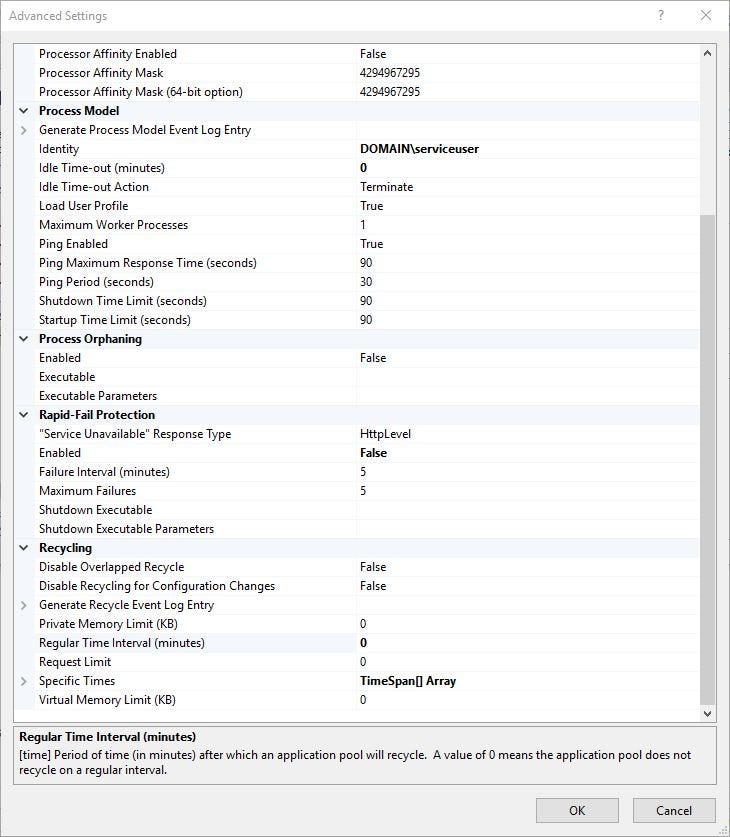
Taşıyacağımız IIS resimlede görüldüğü gibidir. Bir kaç özel ayarları vardır. Mesela;
- OrnekSite’nin 8080 portu ile bind edilmesi,
- OrnekSite Application Pool için resimde görüldüğü üzere özel ayarların bulunması. ( Recyling, Rapid Fail Protection, Identity, Idle Time-out)


Öncelikle Windows PowerShell veya Windows PowerShell ISE uygulamasından birini açalım.
Site Export İşlemi
Export işlemini gerçekleştirecek kod parçacığı aşağıdadır. Bu kod ile C dizininde site.xml adında bir dosya oluşturulur.
$appcmd = $Env:WinDir+'\system32\inetsrv\appcmd.exe'
& $appcmd list site /config /xml > c:\site.xml
Site.XML İçeriği
<?xml version="1.0" encoding="utf-8"?>
<appcmd>
    <SITE SITE.NAME="Default Web Site" SITE.ID="1" bindings="http/*:80:,net.tcp/808:*,net.msmq/localhost,msmq.formatname/localhost,net.pipe/*" state="Started">
        <site name="Default Web Site" id="1">
            <bindings>
                <binding protocol="http" bindingInformation="*:80:" />
                <binding protocol="net.tcp" bindingInformation="808:*" />
                <binding protocol="net.msmq" bindingInformation="localhost" />
                <binding protocol="msmq.formatname" bindingInformation="localhost" />
                <binding protocol="net.pipe" bindingInformation="*" />
            </bindings>
            <limits />
            <logFile>
                <customFields>
                </customFields>
            </logFile>
            <traceFailedRequestsLogging />
            <hsts />
            <applicationDefaults />
            <virtualDirectoryDefaults />
            <ftpServer>
                <connections />
                <security>
                    <dataChannelSecurity />
                    <commandFiltering>
                    </commandFiltering>
                    <ssl />
                    <sslClientCertificates />
                    <authentication>
                        <anonymousAuthentication />
                        <basicAuthentication />
                        <clientCertAuthentication />
                        <customAuthentication>
                            <providers>
                            </providers>
                        </customAuthentication>
                    </authentication>
                    <customAuthorization>
                        <provider />
                    </customAuthorization>
                </security>
                <customFeatures>
                    <providers>
                    </providers>
                </customFeatures>
                <messages />
                <fileHandling />
                <firewallSupport />
                <userIsolation>
                    <activeDirectory />
                </userIsolation>
                <directoryBrowse />
                <logFile />
            </ftpServer>
            <application path="/">
                <virtualDirectoryDefaults />
                <virtualDirectory path="/" physicalPath="C:\inetpub\wwwroot" />
            </application>
        </site>
    </SITE>
    <SITE SITE.NAME="OrnekSite" SITE.ID="2" bindings="http/*:8080:test" state="Started">
        <site name="OrnekSite" id="2">
            <bindings>
                <binding protocol="http" bindingInformation="*:8080:test" />
            </bindings>
            <limits />
            <logFile>
                <customFields>
                </customFields>
            </logFile>
            <traceFailedRequestsLogging />
            <hsts />
            <applicationDefaults />
            <virtualDirectoryDefaults />
            <ftpServer>
                <connections />
                <security>
                    <dataChannelSecurity />
                    <commandFiltering>
                    </commandFiltering>
                    <ssl />
                    <sslClientCertificates />
                    <authentication>
                        <anonymousAuthentication />
                        <basicAuthentication />
                        <clientCertAuthentication />
                        <customAuthentication>
                            <providers>
                            </providers>
                        </customAuthentication>
                    </authentication>
                    <customAuthorization>
                        <provider />
                    </customAuthorization>
                </security>
                <customFeatures>
                    <providers>
                    </providers>
                </customFeatures>
                <messages />
                <fileHandling />
                <firewallSupport />
                <userIsolation>
                    <activeDirectory />
                </userIsolation>
                <directoryBrowse />
                <logFile />
            </ftpServer>
            <application path="/" applicationPool="OrnekSite">
                <virtualDirectoryDefaults />
                <virtualDirectory path="/" physicalPath="C:\" />
            </application>
        </site>
    </SITE>
  </appcmd>
Application Pool Export İşlemi
Export işlemini gerçekleştirecek kod aşağıdadır. Bu kod ile C dizininde pool.xml adında bir dosya oluşturulur.
$appcmd = $Env:WinDir+'\system32\inetsrv\appcmd.exe'
& $appcmd list site /config /xml > c:\site.xml
Pool.XML İçeriği
<?xml version="1.0" encoding="UTF-8"?>
<appcmd>
    <APPPOOL APPPOOL.NAME="DefaultAppPool" PipelineMode="Integrated" RuntimeVersion="v4.0" state="Started">
        <add name="DefaultAppPool">
            <processModel />
            <recycling>
                <periodicRestart>
                    <schedule>
                    </schedule>
                </periodicRestart>
            </recycling>
            <failure />
            <cpu />
            <environmentVariables>
            </environmentVariables>
        </add>
    </APPPOOL>
    <APPPOOL APPPOOL.NAME="Classic .NET AppPool" PipelineMode="Classic" RuntimeVersion="v2.0" state="Started">
        <add name="Classic .NET AppPool" managedRuntimeVersion="v2.0" managedPipelineMode="Classic">
            <processModel />
            <recycling>
                <periodicRestart>
                    <schedule>
                    </schedule>
                </periodicRestart>
            </recycling>
            <failure />
            <cpu />
            <environmentVariables>
            </environmentVariables>
        </add>
    </APPPOOL>
    <APPPOOL APPPOOL.NAME=".NET v2.0 Classic" PipelineMode="Classic" RuntimeVersion="v2.0" state="Started">
        <add name=".NET v2.0 Classic" managedRuntimeVersion="v2.0" managedPipelineMode="Classic">
            <processModel />
            <recycling>
                <periodicRestart>
                    <schedule>
                    </schedule>
                </periodicRestart>
            </recycling>
            <failure />
            <cpu />
            <environmentVariables>
            </environmentVariables>
        </add>
    </APPPOOL>
    <APPPOOL APPPOOL.NAME=".NET v2.0" PipelineMode="Integrated" RuntimeVersion="v2.0" state="Started">
        <add name=".NET v2.0" managedRuntimeVersion="v2.0">
            <processModel />
            <recycling>
                <periodicRestart>
                    <schedule>
                    </schedule>
                </periodicRestart>
            </recycling>
            <failure />
            <cpu />
            <environmentVariables>
            </environmentVariables>
        </add>
    </APPPOOL>
    <APPPOOL APPPOOL.NAME=".NET v4.5 Classic" PipelineMode="Classic" RuntimeVersion="v4.0" state="Started">
        <add name=".NET v4.5 Classic" managedRuntimeVersion="v4.0" managedPipelineMode="Classic">
            <processModel />
            <recycling>
                <periodicRestart>
                    <schedule>
                    </schedule>
                </periodicRestart>
            </recycling>
            <failure />
            <cpu />
            <environmentVariables>
            </environmentVariables>
        </add>
    </APPPOOL>
    <APPPOOL APPPOOL.NAME=".NET v4.5" PipelineMode="Integrated" RuntimeVersion="v4.0" state="Started">
        <add name=".NET v4.5" managedRuntimeVersion="v4.0">
            <processModel />
            <recycling>
                <periodicRestart>
                    <schedule>
                    </schedule>
                </periodicRestart>
            </recycling>
            <failure />
            <cpu />
            <environmentVariables>
            </environmentVariables>
        </add>
    </APPPOOL>
    <APPPOOL APPPOOL.NAME="OrnekSite" PipelineMode="Classic" RuntimeVersion="v4.0" state="Started">
        <add name="OrnekSite" managedRuntimeVersion="v4.0" managedPipelineMode="Classic">
            <processModel identityType="SpecificUser" userName="DOMAIN\serviceuser" password="" />
            <recycling>
                <periodicRestart time="00:00:00">
                    <schedule>
                    </schedule>
                </periodicRestart>
            </recycling>
            <failure rapidFailProtection="false" />
            <cpu />
            <environmentVariables>
            </environmentVariables>
        </add>
    </APPPOOL>
</appcmd>
Site & Pool Import
site.xml ve pool.xml dosyalarımızda tüm IIS ayarlarımız bulunmaktadır. Şimdi istediğimiz makinede import işlemini gerçekleştirebiliriz. Aşağıdaki kod önce Application Pool tanımlamalarını sonra site tanımlamalarını oluşturacak şekilde hazırlanmıştır.
$appcmd = $Env:WinDir+'\system32\inetsrv\appcmd.exe'

get-content "c:\pool.xml" | & $appcmd add apppool /in

get-content "c:\site.xml" | & $appcmd add site /in
PoPowerShell Result:
APPPOOL object “DefaultAppPool” added
APPPOOL object “Classic .NET AppPool” added
APPPOOL object “.NET v2.0 Classic” added
APPPOOL object “.NET v2.0” added
APPPOOL object “.NET v4.5 Classic” added
APPPOOL object “.NET v4.5” added
APPPOOL object “OrnekSite” added
SITE object “Default Web Site” added
SITE object “OrnekSite” added