<br />
<b>Notice</b>:  Function _load_textdomain_just_in_time was called <strong>incorrectly</strong>. Translation loading for the <code>redux-framework</code> domain was triggered too early. This is usually an indicator for some code in the plugin or theme running too early. Translations should be loaded at the <code>init</code> action or later. Please see <a href="https://developer.wordpress.org/advanced-administration/debug/debug-wordpress/">Debugging in WordPress</a> for more information. (This message was added in version 6.7.0.) in <b>/home/ahmetozg/blog/wp-includes/functions.php</b> on line <b>6131</b><br />
<br />
<b>Notice</b>:  Function _load_textdomain_just_in_time was called <strong>incorrectly</strong>. Translation loading for the <code>di-blocks</code> domain was triggered too early. This is usually an indicator for some code in the plugin or theme running too early. Translations should be loaded at the <code>init</code> action or later. Please see <a href="https://developer.wordpress.org/advanced-administration/debug/debug-wordpress/">Debugging in WordPress</a> for more information. (This message was added in version 6.7.0.) in <b>/home/ahmetozg/blog/wp-includes/functions.php</b> on line <b>6131</b><br />
<br />
<b>Notice</b>:  Function _load_textdomain_just_in_time was called <strong>incorrectly</strong>. Translation loading for the <code>insert-headers-and-footers</code> domain was triggered too early. This is usually an indicator for some code in the plugin or theme running too early. Translations should be loaded at the <code>init</code> action or later. Please see <a href="https://developer.wordpress.org/advanced-administration/debug/debug-wordpress/">Debugging in WordPress</a> for more information. (This message was added in version 6.7.0.) in <b>/home/ahmetozg/blog/wp-includes/functions.php</b> on line <b>6131</b><br />
<br />
<b>Notice</b>:  Function _load_textdomain_just_in_time was called <strong>incorrectly</strong>. Translation loading for the <code>voice</code> domain was triggered too early. This is usually an indicator for some code in the plugin or theme running too early. Translations should be loaded at the <code>init</code> action or later. Please see <a href="https://developer.wordpress.org/advanced-administration/debug/debug-wordpress/">Debugging in WordPress</a> for more information. (This message was added in version 6.7.0.) in <b>/home/ahmetozg/blog/wp-includes/functions.php</b> on line <b>6131</b><br />
<?xml version="1.0" encoding="UTF-8"?><rss version="2.0"
	xmlns:content="http://purl.org/rss/1.0/modules/content/"
	xmlns:wfw="http://wellformedweb.org/CommentAPI/"
	xmlns:dc="http://purl.org/dc/elements/1.1/"
	xmlns:atom="http://www.w3.org/2005/Atom"
	xmlns:sy="http://purl.org/rss/1.0/modules/syndication/"
	xmlns:slash="http://purl.org/rss/1.0/modules/slash/"
	>

<channel>
	<title>wordpress &#8211; Ahmet Özgün Özcan</title>
	<atom:link href="https://blog.ahmetozgunozcan.com.tr/tag/wordpress/feed/" rel="self" type="application/rss+xml" />
	<link>https://blog.ahmetozgunozcan.com.tr</link>
	<description>Ahmet Özgün Özcan Blog</description>
	<lastBuildDate>Sat, 04 Dec 2021 04:24:09 +0000</lastBuildDate>
	<language>tr</language>
	<sy:updatePeriod>
	hourly	</sy:updatePeriod>
	<sy:updateFrequency>
	1	</sy:updateFrequency>
	<generator>https://wordpress.org/?v=6.0.2</generator>
	<item>
		<title>Sizteniz ne kadar hızlı?</title>
		<link>https://blog.ahmetozgunozcan.com.tr/sizteniz-ne-kadar-hizli/</link>
					<comments>https://blog.ahmetozgunozcan.com.tr/sizteniz-ne-kadar-hizli/#respond</comments>
		
		<dc:creator><![CDATA[Ahmet Özgün ÖZCAN]]></dc:creator>
		<pubDate>Wed, 25 Dec 2019 21:27:55 +0000</pubDate>
				<category><![CDATA[Tools]]></category>
		<category><![CDATA[site hızı]]></category>
		<category><![CDATA[think with google]]></category>
		<category><![CDATA[tools]]></category>
		<category><![CDATA[wordpress]]></category>
		<guid isPermaLink="false">https://blog.ahmetozgunozcan.com.tr/?p=1661</guid>

					<description><![CDATA[Sitenizin ne kadar hızlı olduğunu ölçün, sonuç raporu alın, iyileştirin ve hızlandırın. Yavaş yüklenen siteler çok çabuk ziyaretçi kaybeder. Hiç kimse ziyaretçi kaybetmek istemez. Ziyarteçileri sisteminizde tutabilmek için sitenizin performansı iyi olmalıdır. Bu performans değeri kullanım sırasında kendini belli eder.  Sitenizin performansını ölçerek yavaşlığa neden olan problemleri öğrenebilirsiniz. Ölçüm sonrası raporlar ile problemleri çözerek sitenizi [&#8230;]]]></description>
										<content:encoded><![CDATA[
<h3 class="kt-adv-heading_12e343-1f wp-block-kadence-advancedheading" data-kb-block="kb-adv-heading_12e343-1f">Sitenizin ne kadar hızlı olduğunu ölçün, sonuç raporu alın, iyileştirin ve hızlandırın.</h3>


<div class="wp-block-stackable-text stk-block-text stk-block stk-30b6597" data-block-id="30b6597"><p class="stk-block-text__text">Yavaş yüklenen siteler çok çabuk ziyaretçi kaybeder. Hiç kimse ziyaretçi kaybetmek istemez. Ziyarteçileri sisteminizde tutabilmek için sitenizin performansı iyi olmalıdır. Bu performans değeri kullanım sırasında kendini belli eder. </p></div>


<div class="wp-block-stackable-text stk-block-text stk-block stk-e50e25d" data-block-id="e50e25d"><p class="stk-block-text__text">Sitenizin performansını ölçerek yavaşlığa neden olan problemleri öğrenebilirsiniz. Ölçüm sonrası raporlar ile problemleri çözerek sitenizi hızlandırabilirsiniz. Raporlarda teknik aksaklıklar, yavaşlığa neden olan imaj, yazı, script, sayfa vb. bulgular listelenmektedir. Hatta bazı raporlarda çözüm önerileri de sunulmaktadır. Ancak doğru ve teknik bulguları olan raporlar performans iyileştirmelerini yapabilmek adına kılavuz olabilir. </p></div>


<p><strong>Think With Google ö</strong>ncesinde “Yavaş bir mobil site işinizi kısıtlar.” başlığı ile sunulan şimdi ise yeni ve daha güçlü arayüzüyle sunulan bu araç sayesinde sitenizin hızını test edebilirsiniz.</p>


<p><a rel="noreferrer noopener" href="https://www.thinkwithgoogle.com/intl/en-gb/feature/testmysite/" target="_blank">Buradan(Think With Google)</a> ilgili sayfaya ulaşabilirsiniz. Test etmek istediğiniz sitenin adresini yazmanız yeterlidir. Sonrasında size güzel bir rapor oluşturacaktır.</p>


<div class="wp-block-stackable-heading stk-block-heading stk-block stk-0edc5cd" data-block-id="0edc5cd"><h2 class="stk-block-heading__text"><strong><span style="color: #000000;" class="stk-highlight">Örnek</span><span style="color: #ffffff;" class="stk-highlight">;</span></strong></h2></div>


<figure class="wp-block-image is-style-default"><img src="https://cdn-images-1.medium.com/max/800/1*Viy-JKPA1kS3eJ2E7y3DOg.png" alt=""/><figcaption>Analiz için site adresinin girilmesi</figcaption></figure>


<figure class="wp-block-image is-resized is-style-default"><img src="https://cdn-images-1.medium.com/max/800/1*wnZWheakKDmrNT153ucc1A.png" alt="" width="790" height="375"/><figcaption>Analiz İşlemleri</figcaption></figure>


<figure class="wp-block-image is-style-default"><img src="https://cdn-images-1.medium.com/max/800/1*NXhUme2wPki_8Kf_TFbBTw.png" alt=""/><figcaption><br>Analiz Sonucu</figcaption></figure>


<div class="wp-block-stackable-text stk-block-text stk-block stk-263a796" data-block-id="263a796"><p class="stk-block-text__text"><strong>“Learn how to optimise your mobile site” ve “Get your full report” </strong>ile faydalı raporlara ulaşarak çözüm önerilerine erişebiliriz.</p></div>


<h2>Sitenizin hızını ölçebileceğiniz bazı araçlar</h2>


<p>Aşağıda listelenen bir çok araç ile raporlar elde edebilirsiniz. Bu raporların sonucunda siteniz için bir puan/sınıf kodu oluşturulacak. Bu puanlamayı nasıl daha iyiye çekebileceğiniz hususunda önerileri de olacak. Adım adım siteniz için gerekli işlemleri yaptıktan sonra sitenizin nasıl hızlandığını göreceksiniz.</p>


<ul><li><a href="https://tools.pingdom.com/" rel="noreferrer noopener" target="_blank">Pingdom Website Speed Test</a></li></ul>


<figure class="wp-block-image is-style-default"><img src="https://cdn-images-1.medium.com/max/800/1*7gi9OUrXlNeqMtBXh3kExw.png" alt=""/><figcaption>Pingdom Website Speed&nbsp;Test</figcaption></figure>


<ul><li><a href="https://developers.google.com/speed/pagespeed/insights" rel="noreferrer noopener" target="_blank">PageSpeed Insights</a></li></ul>


<figure class="wp-block-image is-style-default"><img src="https://cdn-images-1.medium.com/max/800/1*Jqm97Y1l_APsJllViNRnGg.png" alt=""/><figcaption>PageSpeed Insights</figcaption></figure>


<ul><li><a href="https://gtmetrix.com/" rel="noreferrer noopener" target="_blank">GTmetrix</a></li></ul>


<figure class="wp-block-image is-style-default"><img src="https://cdn-images-1.medium.com/max/800/1*_G_DxNAjfngCojY2YulaSQ.png" alt=""/><figcaption>GTmetrix</figcaption></figure>


<ul><li><a href="https://www.webpagetest.org/" rel="noreferrer noopener" target="_blank">WEBPAGETEST</a></li></ul>


<figure class="wp-block-image is-style-default"><img src="https://cdn-images-1.medium.com/max/800/1*FnWKa9apg_acYcH4eJFILw.png" alt=""/><figcaption>WEBPAGETEST</figcaption></figure>


<ul><li><a href="https://www.dotcom-tools.com/" rel="noreferrer noopener" target="_blank">dotcom-tools</a></li></ul>


<figure class="wp-block-image is-style-default"><img src="https://cdn-images-1.medium.com/max/800/1*4dcW5oFFySFrYl0actGEug.png" alt=""/><figcaption>dotcom-tools</figcaption></figure>


<ul><li><a rel="noreferrer noopener" href="https://tools.keycdn.com/" target="_blank">Keycdn</a></li></ul>


<figure class="wp-block-image is-style-default"><img src="https://cdn-images-1.medium.com/max/800/1*wc6qsIKL127WhAygI1yiGA.png" alt=""/><figcaption>Keycdn</figcaption></figure>
]]></content:encoded>
					
					<wfw:commentRss>https://blog.ahmetozgunozcan.com.tr/sizteniz-ne-kadar-hizli/feed/</wfw:commentRss>
			<slash:comments>0</slash:comments>
		
		
			</item>
		<item>
		<title>WordPress Debug açma kapatma</title>
		<link>https://blog.ahmetozgunozcan.com.tr/wordpress-debug-acma-kapatma/</link>
					<comments>https://blog.ahmetozgunozcan.com.tr/wordpress-debug-acma-kapatma/#respond</comments>
		
		<dc:creator><![CDATA[Ahmet Özgün ÖZCAN]]></dc:creator>
		<pubDate>Sat, 14 Dec 2019 22:12:43 +0000</pubDate>
				<category><![CDATA[WordPress]]></category>
		<category><![CDATA[php]]></category>
		<category><![CDATA[wordpress]]></category>
		<guid isPermaLink="false">https://blog.ahmetozgunozcan.com.tr/?p=1620</guid>

					<description><![CDATA[Wordperss sistenizdeki hataları görmek istiyorsanız aşağıdaki kodu kullanabilirsiniz. define( 'WP_DEBUG', true ); Wordperss sistenizdeki hataları gizlemek istiyorsanız aşağıdaki kodu kullanabilirsiniz. define( 'WP_DEBUG', false); Bu kodu wp-config.php dosyasına yazmanız gerekmektedir.]]></description>
										<content:encoded><![CDATA[<p>Wordperss sistenizdeki hataları görmek istiyorsanız aşağıdaki kodu kullanabilirsiniz.</p>
<p><code class="EnlighterJSRAW" data-enlighter-language="php">define( 'WP_DEBUG', true );</code></p>
<p>Wordperss sistenizdeki hataları gizlemek istiyorsanız aşağıdaki kodu kullanabilirsiniz.</p>
<p><code class="EnlighterJSRAW" data-enlighter-language="php">define( 'WP_DEBUG', false);</code></p>
<p>Bu kodu wp-config.php dosyasına yazmanız gerekmektedir.</p>
]]></content:encoded>
					
					<wfw:commentRss>https://blog.ahmetozgunozcan.com.tr/wordpress-debug-acma-kapatma/feed/</wfw:commentRss>
			<slash:comments>0</slash:comments>
		
		
			</item>
		<item>
		<title>Çoklu Dil &#8211; Poedit Aracı</title>
		<link>https://blog.ahmetozgunozcan.com.tr/wordpress-coklu-dil-poedit-araci/</link>
					<comments>https://blog.ahmetozgunozcan.com.tr/wordpress-coklu-dil-poedit-araci/#respond</comments>
		
		<dc:creator><![CDATA[Ahmet Özgün ÖZCAN]]></dc:creator>
		<pubDate>Mon, 28 Oct 2019 21:28:57 +0000</pubDate>
				<category><![CDATA[WordPress]]></category>
		<category><![CDATA[wordpress]]></category>
		<guid isPermaLink="false">https://blog.ahmetozgunozcan.com.tr/?p=1022</guid>

					<description><![CDATA[Bu yazımızda WordPress için çoklu dil aracı olan poedit uygulaması ile küçük bir örnek yapacağız. Poedit uygulamasi kullanarak wordpress internet sitenizdeki dil dosyalarini güncelleyebilirsiniz. Hizli ve kolay bir sekilde çevirim islemlerini gerçeklestirebileceginiz bir uygulamadir. Tek tek dil güncellemelerini yapmak yerine “.po” uzantili dosyayi tek bir yerden rahatça güncelleyebilirsiniz. Poedit, pek çok PHP projesi (Drupal, WordPress), [&#8230;]]]></description>
										<content:encoded><![CDATA[
<p>Bu yazımızda WordPress için çoklu dil aracı olan poedit uygulaması ile küçük bir örnek yapacağız.</p>


<p>Poedit uygulamasi kullanarak wordpress internet sitenizdeki dil dosyalarini güncelleyebilirsiniz. Hizli ve kolay bir sekilde çevirim islemlerini gerçeklestirebileceginiz bir uygulamadir. Tek tek dil güncellemelerini yapmak yerine “.po” uzantili dosyayi tek bir yerden rahatça güncelleyebilirsiniz.</p>


<p>Poedit, pek çok PHP projesi (Drupal, WordPress), Python projeleri (Django) veya Linux’ta çalisan hemen hemen her sey tarafindan kullanilan “.po” uzantili dosyalari kullanarak çeviri islemleri yapabilmek için gelistirilmis bir uygulamadir. Minimal ve sezgisel bir arayüz ile çevirilerin kolay yönetimi saglanir.</p>


<p>Öncelikle uygulamayı <a href="https://poedit.net/" rel="noreferrer noopener" target="_blank"><strong>https://poedit.net/</strong></a> linkine tıklayarak açılan sitede “Download” menüsü ile indirebilirsiniz. Kurulum dosyasini indirdikten sonra kurulum islemini baslatiniz.</p>


<figure class="wp-block-image is-style-default"><img src="https://cdn-images-1.medium.com/max/800/1*DZgeIxyOJxKS0SVRU7BMgw.jpeg" alt=""/></figure>


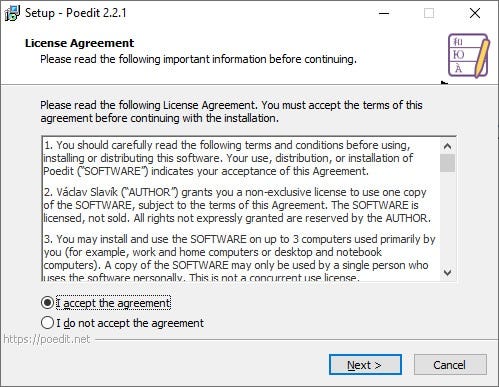
<p>Lisans Sözlesmesi Ekrani. Sözlesmeyi kabul edip next tusuna basiniz.</p>


<figure class="wp-block-image is-style-default"><img src="https://cdn-images-1.medium.com/max/800/1*RuSPQE9KEYB3h4F-CiLU_Q.jpeg" alt=""/></figure>


<p>Kurulumun yapilacagi path seçimini yapip veya standart pathi degistirmeyip next tusuna basiniz.</p>


<figure class="wp-block-image is-style-default"><img src="https://cdn-images-1.medium.com/max/800/1*_2w7iJLNG_uKCw4SD5qWNQ.jpeg" alt=""/></figure>


<p>Kurulum ayarlari bitti. Kuruluma baslamasi için install tusuna basiniz.</p>


<figure class="wp-block-image is-style-default"><img src="https://cdn-images-1.medium.com/max/800/1*wV0xQDl9q8hdejwGLivjWA.jpeg" alt=""/></figure>


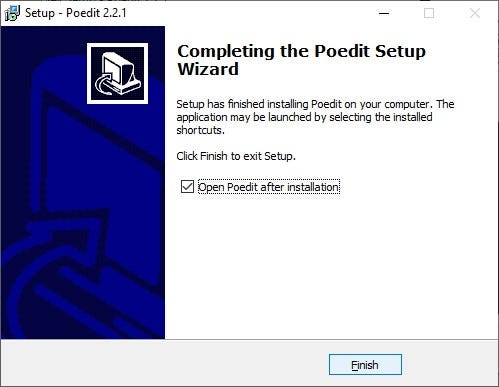
<p>Kurulum islemi tamamlandi. Şimdi poeditin nasıl kullanılacağına dair örnek yapalım.</p>


<figure class="wp-block-image is-style-default"><img src="https://cdn-images-1.medium.com/max/800/1*Laa8mOHuwqRmB6_6pyJMrQ.jpeg" alt=""/></figure>


<p>Kurulumdan sonra bu ekran açılacaktır. Biz bu uygulamada free olan Edit a translation modülünü kullanacağız. “Edit a translation” menüsüne tıklayalım. Bizden edit edecegimiz bir dosya isteyecektir. Bu dosya “.po” uzantılı veya “.pot” uzantılı olabilir. Ben varolan template içerisindeki “.pot” uzantılı dosyayı seçtim. (WordPress için genelde template içerisinde language klasöründe bulunur.)</p>


<figure class="wp-block-image is-style-default"><img src="https://cdn-images-1.medium.com/max/800/0*0sIBgSTSfDPuALSx.jpg" alt=""/></figure>


<figure class="wp-block-image is-style-default"><img src="https://cdn-images-1.medium.com/max/800/1*FP-jc0fEO-L2sMwyNpQxSQ.jpeg" alt=""/></figure>


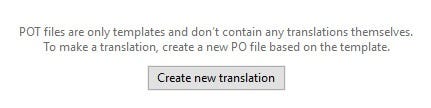
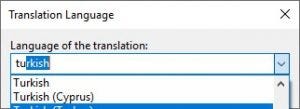
<p>POT dosyasi seçtigimiz için dosyamızı açacak ancak güncelleme yapmamıza izin vermeyecek. Ekranın alt kısmında şu mesajı göreceksiniz. Bu ekrandaki “Create new translation” butonunu kullanarak bir dil seçimi yapıyoruz.</p>


<figure class="wp-block-image is-style-default"><img src="https://cdn-images-1.medium.com/max/800/1*gZghCJSVJGoOZGoKV6Ri-w.jpeg" alt=""/></figure>


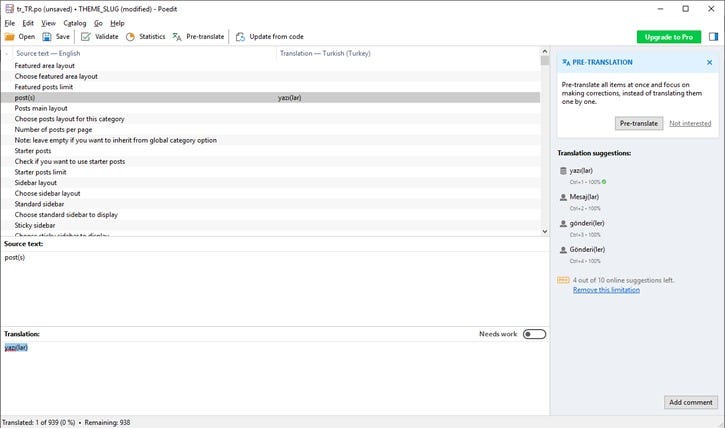
<p>Sonrasında çevrim islemlerini yapabilecegimiz ekran açiliyor. Çevrim islemlerini bitirdikten sonra kaydederek yeni “.po” uzantılı dosyamızı hazırlamış oluyoruz.</p>
]]></content:encoded>
					
					<wfw:commentRss>https://blog.ahmetozgunozcan.com.tr/wordpress-coklu-dil-poedit-araci/feed/</wfw:commentRss>
			<slash:comments>0</slash:comments>
		
		
			</item>
	</channel>
</rss>