<br />
<b>Notice</b>:  Function _load_textdomain_just_in_time was called <strong>incorrectly</strong>. Translation loading for the <code>redux-framework</code> domain was triggered too early. This is usually an indicator for some code in the plugin or theme running too early. Translations should be loaded at the <code>init</code> action or later. Please see <a href="https://developer.wordpress.org/advanced-administration/debug/debug-wordpress/">Debugging in WordPress</a> for more information. (This message was added in version 6.7.0.) in <b>/home/ahmetozg/blog/wp-includes/functions.php</b> on line <b>6131</b><br />
<br />
<b>Notice</b>:  Function _load_textdomain_just_in_time was called <strong>incorrectly</strong>. Translation loading for the <code>di-blocks</code> domain was triggered too early. This is usually an indicator for some code in the plugin or theme running too early. Translations should be loaded at the <code>init</code> action or later. Please see <a href="https://developer.wordpress.org/advanced-administration/debug/debug-wordpress/">Debugging in WordPress</a> for more information. (This message was added in version 6.7.0.) in <b>/home/ahmetozg/blog/wp-includes/functions.php</b> on line <b>6131</b><br />
<br />
<b>Notice</b>:  Function _load_textdomain_just_in_time was called <strong>incorrectly</strong>. Translation loading for the <code>insert-headers-and-footers</code> domain was triggered too early. This is usually an indicator for some code in the plugin or theme running too early. Translations should be loaded at the <code>init</code> action or later. Please see <a href="https://developer.wordpress.org/advanced-administration/debug/debug-wordpress/">Debugging in WordPress</a> for more information. (This message was added in version 6.7.0.) in <b>/home/ahmetozg/blog/wp-includes/functions.php</b> on line <b>6131</b><br />
<br />
<b>Notice</b>:  Function _load_textdomain_just_in_time was called <strong>incorrectly</strong>. Translation loading for the <code>voice</code> domain was triggered too early. This is usually an indicator for some code in the plugin or theme running too early. Translations should be loaded at the <code>init</code> action or later. Please see <a href="https://developer.wordpress.org/advanced-administration/debug/debug-wordpress/">Debugging in WordPress</a> for more information. (This message was added in version 6.7.0.) in <b>/home/ahmetozg/blog/wp-includes/functions.php</b> on line <b>6131</b><br />
<?xml version="1.0" encoding="UTF-8"?><rss version="2.0"
	xmlns:content="http://purl.org/rss/1.0/modules/content/"
	xmlns:wfw="http://wellformedweb.org/CommentAPI/"
	xmlns:dc="http://purl.org/dc/elements/1.1/"
	xmlns:atom="http://www.w3.org/2005/Atom"
	xmlns:sy="http://purl.org/rss/1.0/modules/syndication/"
	xmlns:slash="http://purl.org/rss/1.0/modules/slash/"
	>

<channel>
	<title>WordPress &#8211; Ahmet Özgün Özcan</title>
	<atom:link href="https://blog.ahmetozgunozcan.com.tr/wordpress/feed/" rel="self" type="application/rss+xml" />
	<link>https://blog.ahmetozgunozcan.com.tr</link>
	<description>Ahmet Özgün Özcan Blog</description>
	<lastBuildDate>Sat, 04 Dec 2021 04:24:09 +0000</lastBuildDate>
	<language>tr</language>
	<sy:updatePeriod>
	hourly	</sy:updatePeriod>
	<sy:updateFrequency>
	1	</sy:updateFrequency>
	<generator>https://wordpress.org/?v=6.3.2</generator>
	<item>
		<title>WordPress Debug açma kapatma</title>
		<link>https://blog.ahmetozgunozcan.com.tr/wordpress-debug-acma-kapatma/</link>
					<comments>https://blog.ahmetozgunozcan.com.tr/wordpress-debug-acma-kapatma/#respond</comments>
		
		<dc:creator><![CDATA[Ahmet Özgün ÖZCAN]]></dc:creator>
		<pubDate>Sat, 14 Dec 2019 22:12:43 +0000</pubDate>
				<category><![CDATA[WordPress]]></category>
		<category><![CDATA[php]]></category>
		<category><![CDATA[wordpress]]></category>
		<guid isPermaLink="false">https://blog.ahmetozgunozcan.com.tr/?p=1620</guid>

					<description><![CDATA[Wordperss sistenizdeki hataları görmek istiyorsanız aşağıdaki kodu kullanabilirsiniz. define( 'WP_DEBUG', true ); Wordperss sistenizdeki hataları gizlemek istiyorsanız aşağıdaki kodu kullanabilirsiniz. define( 'WP_DEBUG', false); Bu kodu wp-config.php dosyasına yazmanız gerekmektedir.]]></description>
										<content:encoded><![CDATA[<p>Wordperss sistenizdeki hataları görmek istiyorsanız aşağıdaki kodu kullanabilirsiniz.</p>
<p><code class="EnlighterJSRAW" data-enlighter-language="php">define( 'WP_DEBUG', true );</code></p>
<p>Wordperss sistenizdeki hataları gizlemek istiyorsanız aşağıdaki kodu kullanabilirsiniz.</p>
<p><code class="EnlighterJSRAW" data-enlighter-language="php">define( 'WP_DEBUG', false);</code></p>
<p>Bu kodu wp-config.php dosyasına yazmanız gerekmektedir.</p>
]]></content:encoded>
					
					<wfw:commentRss>https://blog.ahmetozgunozcan.com.tr/wordpress-debug-acma-kapatma/feed/</wfw:commentRss>
			<slash:comments>0</slash:comments>
		
		
			</item>
		<item>
		<title>Çoklu Dil &#8211; Poedit Aracı</title>
		<link>https://blog.ahmetozgunozcan.com.tr/wordpress-coklu-dil-poedit-araci/</link>
					<comments>https://blog.ahmetozgunozcan.com.tr/wordpress-coklu-dil-poedit-araci/#respond</comments>
		
		<dc:creator><![CDATA[Ahmet Özgün ÖZCAN]]></dc:creator>
		<pubDate>Mon, 28 Oct 2019 21:28:57 +0000</pubDate>
				<category><![CDATA[WordPress]]></category>
		<category><![CDATA[wordpress]]></category>
		<guid isPermaLink="false">https://blog.ahmetozgunozcan.com.tr/?p=1022</guid>

					<description><![CDATA[Bu yazımızda WordPress için çoklu dil aracı olan poedit uygulaması ile küçük bir örnek yapacağız. Poedit uygulamasi kullanarak wordpress internet sitenizdeki dil dosyalarini güncelleyebilirsiniz. Hizli ve kolay bir sekilde çevirim islemlerini gerçeklestirebileceginiz bir uygulamadir. Tek tek dil güncellemelerini yapmak yerine “.po” uzantili dosyayi tek bir yerden rahatça güncelleyebilirsiniz. Poedit, pek çok PHP projesi (Drupal, WordPress), [&#8230;]]]></description>
										<content:encoded><![CDATA[
<p>Bu yazımızda WordPress için çoklu dil aracı olan poedit uygulaması ile küçük bir örnek yapacağız.</p>


<p>Poedit uygulamasi kullanarak wordpress internet sitenizdeki dil dosyalarini güncelleyebilirsiniz. Hizli ve kolay bir sekilde çevirim islemlerini gerçeklestirebileceginiz bir uygulamadir. Tek tek dil güncellemelerini yapmak yerine “.po” uzantili dosyayi tek bir yerden rahatça güncelleyebilirsiniz.</p>


<p>Poedit, pek çok PHP projesi (Drupal, WordPress), Python projeleri (Django) veya Linux’ta çalisan hemen hemen her sey tarafindan kullanilan “.po” uzantili dosyalari kullanarak çeviri islemleri yapabilmek için gelistirilmis bir uygulamadir. Minimal ve sezgisel bir arayüz ile çevirilerin kolay yönetimi saglanir.</p>


<p>Öncelikle uygulamayı <a href="https://poedit.net/" rel="noreferrer noopener" target="_blank"><strong>https://poedit.net/</strong></a> linkine tıklayarak açılan sitede “Download” menüsü ile indirebilirsiniz. Kurulum dosyasini indirdikten sonra kurulum islemini baslatiniz.</p>


<figure class="wp-block-image is-style-default"><img decoding="async" src="https://cdn-images-1.medium.com/max/800/1*DZgeIxyOJxKS0SVRU7BMgw.jpeg" alt=""/></figure>


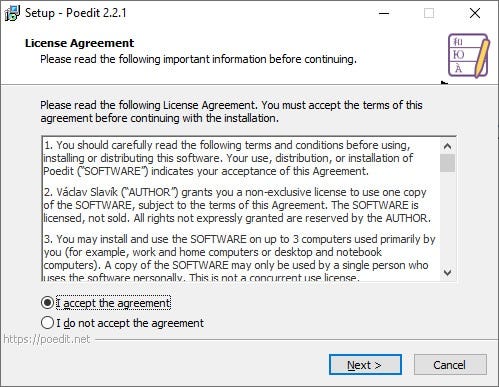
<p>Lisans Sözlesmesi Ekrani. Sözlesmeyi kabul edip next tusuna basiniz.</p>


<figure class="wp-block-image is-style-default"><img decoding="async" src="https://cdn-images-1.medium.com/max/800/1*RuSPQE9KEYB3h4F-CiLU_Q.jpeg" alt=""/></figure>


<p>Kurulumun yapilacagi path seçimini yapip veya standart pathi degistirmeyip next tusuna basiniz.</p>


<figure class="wp-block-image is-style-default"><img decoding="async" src="https://cdn-images-1.medium.com/max/800/1*_2w7iJLNG_uKCw4SD5qWNQ.jpeg" alt=""/></figure>


<p>Kurulum ayarlari bitti. Kuruluma baslamasi için install tusuna basiniz.</p>


<figure class="wp-block-image is-style-default"><img decoding="async" src="https://cdn-images-1.medium.com/max/800/1*wV0xQDl9q8hdejwGLivjWA.jpeg" alt=""/></figure>


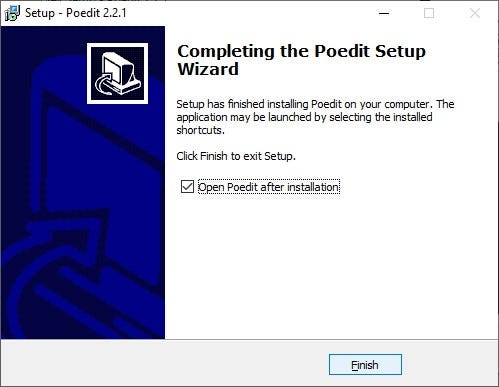
<p>Kurulum islemi tamamlandi. Şimdi poeditin nasıl kullanılacağına dair örnek yapalım.</p>


<figure class="wp-block-image is-style-default"><img decoding="async" src="https://cdn-images-1.medium.com/max/800/1*Laa8mOHuwqRmB6_6pyJMrQ.jpeg" alt=""/></figure>


<p>Kurulumdan sonra bu ekran açılacaktır. Biz bu uygulamada free olan Edit a translation modülünü kullanacağız. “Edit a translation” menüsüne tıklayalım. Bizden edit edecegimiz bir dosya isteyecektir. Bu dosya “.po” uzantılı veya “.pot” uzantılı olabilir. Ben varolan template içerisindeki “.pot” uzantılı dosyayı seçtim. (WordPress için genelde template içerisinde language klasöründe bulunur.)</p>


<figure class="wp-block-image is-style-default"><img decoding="async" src="https://cdn-images-1.medium.com/max/800/0*0sIBgSTSfDPuALSx.jpg" alt=""/></figure>


<figure class="wp-block-image is-style-default"><img decoding="async" src="https://cdn-images-1.medium.com/max/800/1*FP-jc0fEO-L2sMwyNpQxSQ.jpeg" alt=""/></figure>


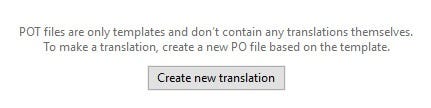
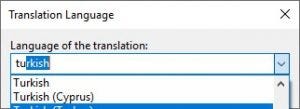
<p>POT dosyasi seçtigimiz için dosyamızı açacak ancak güncelleme yapmamıza izin vermeyecek. Ekranın alt kısmında şu mesajı göreceksiniz. Bu ekrandaki “Create new translation” butonunu kullanarak bir dil seçimi yapıyoruz.</p>


<figure class="wp-block-image is-style-default"><img decoding="async" src="https://cdn-images-1.medium.com/max/800/1*gZghCJSVJGoOZGoKV6Ri-w.jpeg" alt=""/></figure>


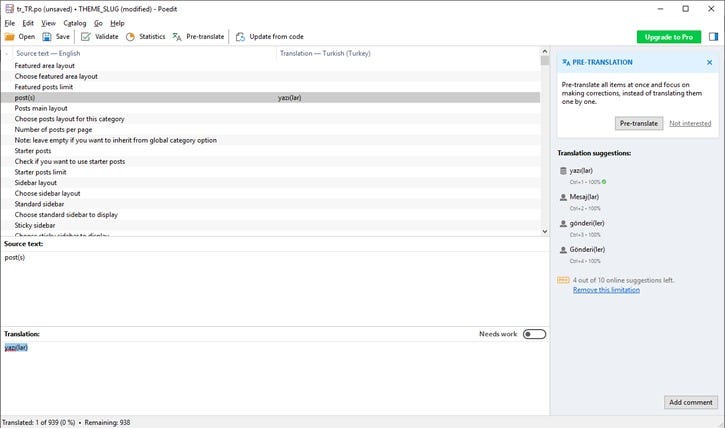
<p>Sonrasında çevrim islemlerini yapabilecegimiz ekran açiliyor. Çevrim islemlerini bitirdikten sonra kaydederek yeni “.po” uzantılı dosyamızı hazırlamış oluyoruz.</p>
]]></content:encoded>
					
					<wfw:commentRss>https://blog.ahmetozgunozcan.com.tr/wordpress-coklu-dil-poedit-araci/feed/</wfw:commentRss>
			<slash:comments>0</slash:comments>
		
		
			</item>
	</channel>
</rss>